I usually try to quickly update my devices to the latest versions of the operating system. So, I got caught up in the iOS 8.0.1 issues yesterday. In case you are still struggling with it, here is how to fix it.
Maybe I will just wait until I hear if it fails when iOS 8.0.2 comes out.
I never put much effort to the tech rumors. I do read them, but I don’t put much into them. It seems to me like people take so much from them that they get overly disappointed when they don’t get what was rumored. Just wait for the announcements and don’t put much into the rumors.
Are we getting to a point with technology where are getting into a notification overload? Do we really need to be alerted to every little thing that is going on in the world? Do we really need to know the instant we get a new email, a new message, or a new follower? It is becoming taboo to not instantly respond to these alerts?
I feel that we are getting to a point where we are just being bombarded with notifications. Collecting the notifications in one area is not a bad idea, but every notification by default wanting our attention? I don’t think that is a good idea. In iOS 6, after I give an app permission to send me notifications, I will go see what it has set as default for options. If I don’t feel that app deserves to have sounds in their notifications, I will turn it off. (A word of caution with that – I have seen apps that will then nag you to turn the notification sounds on.) If the app become abusive with their notifications, I will turn them off (completely if the app does not have granular controls). I also pay attention when an app asks for permission to send me notifications, and will not allow it for apps that I don’t feel need to send me notifications.
Are we becoming so dependent on knowing what is going on? Has society forgotten how to disconnect? Have we gotten to a point where we need an instant response from people?
I think all this information and notification overload is not helping society and may actually be separating people from their surroundings.
And then the ad notifications… don’t get me started on those.
I’ve taken the plunge into Windows 8. I added in a solid state hard drive into my Windows 7 desktop computer so I could dual-boot Windows 7 and 8. I won’t make any speed observations since I used a solid state drive for Windows 8 and Windows 7 is on a traditional hard drive. I used the System Builder install for Windows 8 as the license terms for the update do not allow for dual-boot.
Microsoft has really made the jump into making Windows 8 a touch based operating system, basically at the cost of traditional computer experience The new start screen and the new Windows 8-style/tiled apps are very touch-oriented that can make it feel weird on a desktop. Many of the Win 8 style apps scroll right to left instead of up and down. Even though a traditional scroll wheel will work, it is still an unusual feeling and doesn’t feel right on a traditional computer.
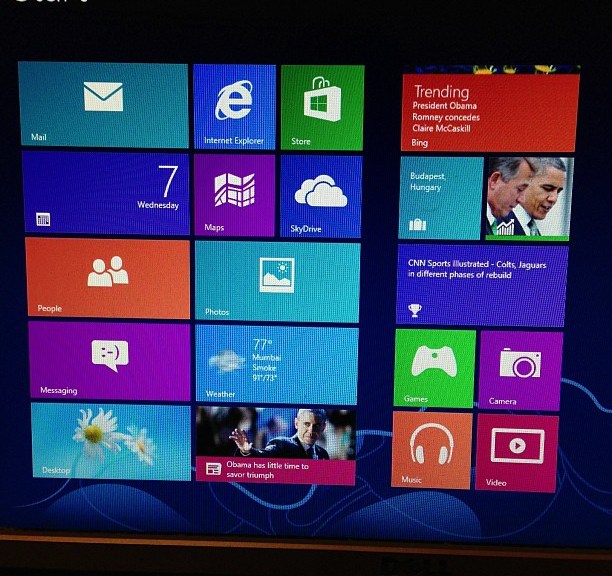
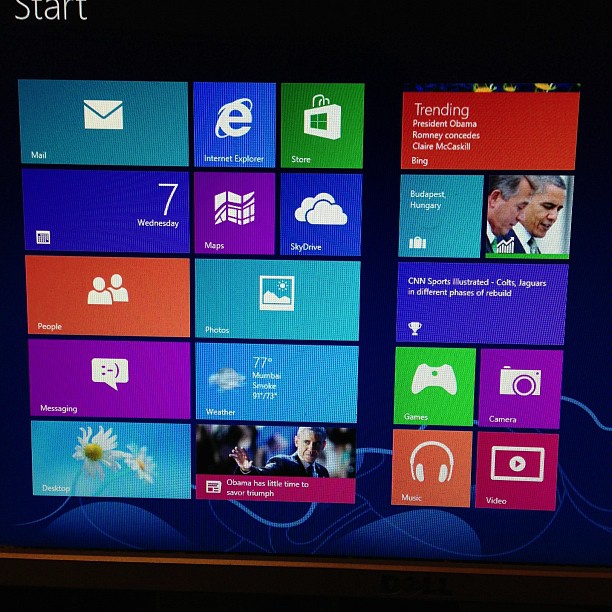
One of the new things on the Windows 8 start screen is the “live tiles” that the Windows 8 style apps can use. Live tiles come over from Windows Phone. I do like the live tiles and the quick overview of the information that they offer.
Windows 8 beings in some integration of social media. You can link up your Twitter, Facebook, Microsoft, and LinkedIn accounts. This will put all the connections from each account into the People app, so be ready to see everyone you follow on Twitter in the People app.
One of the changes in Windows 8 is the Charms menu. In the Charms menu, you have your search options, a sharing option, the button that gets you to the Start screen, a devices menu and a settings area. In a Windows 8 style app, the settings area is where the options that used to be in the menu bar are. The settings area is also where you go to shut down or restart the computer.
The old Windows you are used to is still there in Window 8 in the Desktop “app.” The UI has been tweaked to better fit with the Windows 8 style. File Explorer, formerly Windows Explorer, has been given the ribbon interface from Office.
Windows 8 gives a couple of new options for logging in to the computer in addition to your standard password. These are more oriented to touch screen users (like the picture unlock), but the option of having a PIN could have some advantages on traditional computers.
I am using a dual monitor setup on this computer and I have noticed that all the Windows 8 style area stay on one monitor and the desktop will be on the other monitor. Also, the taskbar now appears on both screens.
At least on my setup, it looks like Microsoft has moved the “Install Updates and…” from shut down to a restart.
In my opinion, Windows 8 is not as bad it is has been made out to be. It is not perfect, and it will cause confusion for some users. Some people have complained about the iOSification of OS X by Apple. Microsoft has mobilized Windows 8 so much that it can detract from the traditional PC experience, far more than what Apple has done. With more computing going into tablets and more touch screens appearing, Microsoft is looking at the future with Windows 8, and it does look like it is a good mobile operating system. However, for traditional computers, it isn’t the greatest, but it can work if you are willing to deal with the changes.

 Mike J. Steele
You must be logged in to post a comment.